Showing posts with label "QR Code". Show all posts

20081116

How to - make your own QR Code

[if you watch CSI:NY on CBS, the episode last week featured QR codes on the back of the 'tell all' stationary that was part of the murder investigation]

I have already shown how you can decode a QR code - and now you want to create a QR code of your own. Start by going to the Google Chart API developers guide. In addition to the standard line charts, bar charts, pie charts, Venn diagrams and maps - the Google Chart API also supports QR codes.

You call the API just as you would call any other image that you would link to;

http://chart.apis.google.com/chart?cht=qr&chl=URL:http://www.strongholddigitalservices.com&choe=utf-8&chs=200x200&chld=Q|10
  • Chart AP - http://chart.apis.google.com/chart?
  • Chart type - cht=qr
  • Data to encode - chl=URL:http://www.strongholddigitalservices.com
  • Encoding - choe=utf-8
  • Size (in pixels) - chs=200x200
  • Error correction | margin - chld=H|5
Note - the amount of data will determine how many bits are in the QR code. The size just determines how big the output will be.

The Error correction letter says defines how much of the QR code can be missing or obscured, while still allowing the data to be retrieved. The 'H' code allows up to 30% of the image to be missing or obscured, and still able to maintain the data.

Here are some samples to illustrate the differences.

Size 200x200, Error Correction = H


Size 100x100, Error Correction = H


Size 200x200, Error Correction = L (worst, only 7% error/missing/obscure)

All three images contain the exact same data - but they differ only in size (between 1st and 2nd) and data correction (1st and 3rd).

Now - why has Google gone to such trouble to include the QR code in their Chart library? I don't know for sure - but it happens to be part of their Android mobile phone OS on TMobile's G1 handset. Beyond that - we will have to see if these start showing up and get adopted by more than just the twenty-something's.

20081022

Minor Challenge results

Last week - I posted two images - one of which is above - and challenged someone to decode it. No one rose to the challenge.

This is a 2-dimensional bar code - in the QR Code format. One of the leading uses of QR Codes is to;

QR Codes storing addresses and URLs may appear in magazines, on signs, buses, business cards or just about any object that users might need information about. Users with a camera phone equipped with the correct reader software can scan the image of the QR Code causing the phone's browser to launch and redirect to the programmed URL.

If your phone isn't set-up to translate the above image - then there are on-line websites available to allow you to decode the image.
  1. Save image to your computer
  2. Go to Zxing decoder online site
  3. Browse to the location of the saved image file (or if the image is posted on-line - you can point the web page to the URL of the image)
  4. Submit query
  5. Decoded text is returned to the web browser as a line of text
Performing that decode on the above QR Code should display the following information;

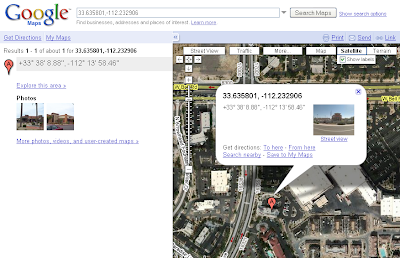
geo:33.635801,-112.232906

The 'geo:' denotes geographic co-ordinates. So go over and open Google Maps and enter the Co-ordinates (actual lat-long) in the search box at the top.

You should get a image/map (depending on your settings) that looks similiar to this image;


That location - denotes my local Chick-Fil-A. Where you can find me getting breakfast during the week between 9am and 9:15am MST (about 1/2 the time).

Decoding the 2nd barcode is left as an exercise to the reader.

[Next - how to create a QR code of your own]